Key Takeaways
- Interactive whiteboards function as managed IT endpoints, not just screens
- Device management and security determine institutional acceptance
- Software compatibility influences long-term usability
- Uptime and serviceability drive total cost of ownership
- Hardware features alone do not determine procurement decisions
Why Does IT Integration Matter More Than Screen Resolution?
Interactive whiteboards in institutional environments are not standalone presentation devices-they are networked endpoints subject to the same authentication, security, and management protocols as computers, tablets, and access points. Schools and enterprises evaluate these systems based on their ability to integrate with existing identity management infrastructure, including single sign-on (SSO) through LDAP, Active Directory, or cloud-based identity providers such as Google Workspace and Microsoft Entra ID.
Network authentication ensures that only authorized users can access the device, content libraries, and collaboration tools. Software deployment workflows must align with institutional standards: IT administrators require centralized application distribution, policy enforcement, and the ability to push updates without physically accessing each classroom or conference room. This operational requirement often outweighs incremental improvements in display resolution or touch accuracy.
Platform compatibility with learning management systems (LMS) such as Canvas, Moodle, and Blackboard, as well as enterprise collaboration tools like Microsoft Teams, Zoom Rooms, and Webex, determines daily usability. A whiteboard that lacks native integration with these platforms introduces friction, requiring workarounds, third-party connectors, or manual export processes that reduce instructional time and increase support requests. Procurement decisions therefore prioritize API availability, standards compliance (such as support for HDMI-CEC, NDI, or SIP protocols), and validated interoperability over superficial hardware enhancements.
How Do Device Management Systems Shape Interactive Whiteboard Operations?
Enterprise and education IT departments treat interactive whiteboards as managed devices within mobile device management (MDM) or unified endpoint management (UEM) systems. Platforms such as Jamf, Microsoft Intune, VMware Workspace ONE, and Google Admin Console provide centralized control over firmware updates, application whitelisting, configuration profiles, and remote troubleshooting.
Remote update capabilities are critical in environments with distributed deployments across multiple buildings or campuses. IT staff cannot manually service hundreds of devices during limited maintenance windows. Whiteboards that support over-the-air (OTA) updates and silent installation minimize downtime and ensure security patches are applied consistently. Monitoring dashboards provide real-time telemetry on device health, usage patterns, and error logs, enabling proactive maintenance before failures disrupt instruction or meetings.
Policy enforcement through MDM allows institutions to restrict unauthorized application installation, disable consumer features (such as personal account logins), and ensure compliance with data privacy regulations including FERPA, COPPA, and GDPR. Devices that cannot be enrolled in existing management systems create shadow IT risks and increase administrative overhead. Procurement teams therefore prioritize vendors that support standard management protocols and provide enterprise-grade administrative interfaces.
Why Is Reliability and Uptime Critical in Education and Enterprise Environments?
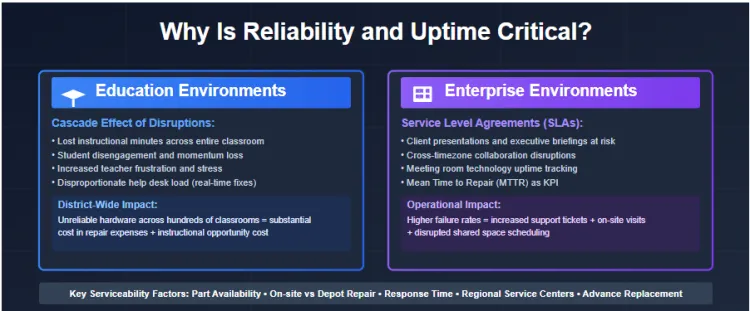
In educational settings, a single classroom disruption cascades into lost instructional minutes, student disengagement, and increased teacher frustration. A study by the Consortium for School Networking (CoSN) found that technical failures during class time generate disproportionate help desk load, as issues must be resolved in real time to maintain lesson momentum. Multiply this across a district with hundreds of classrooms, and the cost of unreliable hardware becomes substantial, not just in repair expenses, but in instructional opportunity cost.
Enterprise environments maintain service level agreements (SLAs) for meeting room technology. A whiteboard failure in a conference room disrupts client presentations, executive briefings, and collaborative sessions that may involve external participants across time zones. Facilities teams track uptime metrics and mean time to repair (MTTR) as key performance indicators. Devices with higher failure rates generate support tickets, require on-site technician visits, and disrupt scheduled use of shared spaces.
Serviceability factors include part availability, on-site versus depot repair policies, and response time guarantees. Institutions evaluate whether a vendor maintains regional service centers, stocks replacement components, and provides advance replacement units. These operational considerations often carry more weight than touch latency or ambient light performance, as even the best display becomes worthless if it cannot be repaired within acceptable timeframes.
How Do Software Ecosystems Create Vendor Lock-In?
Interactive whiteboard vendors increasingly embed proprietary collaboration software, content libraries, and annotation tools that become integral to instructional workflows. Teachers develop lesson plans around specific features, infinite canvas capabilities, pre-built templates, integration with assessment platforms, that may not transfer seamlessly to competing hardware. This creates switching costs that extend beyond the initial capital purchase.
Content portability becomes a strategic concern: schools that have accumulated years of instructional materials in a vendor's proprietary format face significant migration challenges if they attempt to change platforms. Enterprises encounter similar issues with meeting recordings, annotated diagrams, and project templates stored in vendor-specific cloud repositories.
Cloud-based collaboration features may require ongoing subscription fees separate from the hardware purchase. Total cost of ownership (TCO) calculations must therefore include software licensing, storage costs, and the expense of training staff on new platforms if the institution changes vendors. Procurement teams increasingly demand open file formats, export capabilities, and API access to mitigate long-term dependency on a single supplier.
Why Do Institutions Prioritize Lifecycle Support Over Hardware Specifications?
Budget cycles in education and enterprise environments operate on multi-year planning horizons. A district or corporation purchasing interactive whiteboards expects those devices to remain operational and supported for 5-7 years. Warranty terms, extended service plans, and software support commitments define the true cost and risk profile of the investment.
Standard manufacturer warranties may cover hardware defects but exclude accidental damage, which is common in high-traffic classroom environments. Institutions evaluate whether vendors offer affordable accidental damage protection, whether replacement parts remain available throughout the expected lifecycle, and whether software updates will continue to be provided without forced hardware upgrades.
Replacement cycles impact capital planning. Devices that fail prematurely or become unsupported force unscheduled budget allocations, disrupting other technology initiatives. Conversely, platforms with extended support reduce the frequency of forklift upgrades and allow institutions to depreciate assets more predictably. Procurement contracts therefore include clauses specifying minimum support periods, security update commitments, and end-of-life notification requirements-factors that have nothing to do with display technology but everything to do with operational sustainability.
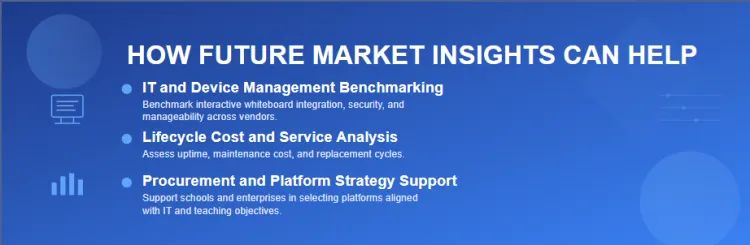
How Future Market Insights Can Help
Bibliography
- Consortium for School Networking. (2023). IT leadership survey: Infrastructure and support trends in K-12 education. CoSN. https://www.cosn.org
- EdTech Magazine. (2024). Interactive display procurement and integration best practices. CDW-G. https://edtechmagazine.com
- International Society for Technology in Education. (2024). ISTE standards for education technology management. ISTE. https://www.iste.org
- National Institute of Standards and Technology. (2023). Cybersecurity framework for education institutions (NIST SP 800-171). USA Department of Commerce. https://www.nist.gov
- Promethean. (2024). ActivPanel 9 enterprise deployment and device management guide. Promethean World Ltd. https://www.prometheanworld.com
- SMART Technologies. (2024). SMART Board integration with enterprise MDM platforms: Technical specifications. SMART Technologies ULC. https://www.smarttech.com